
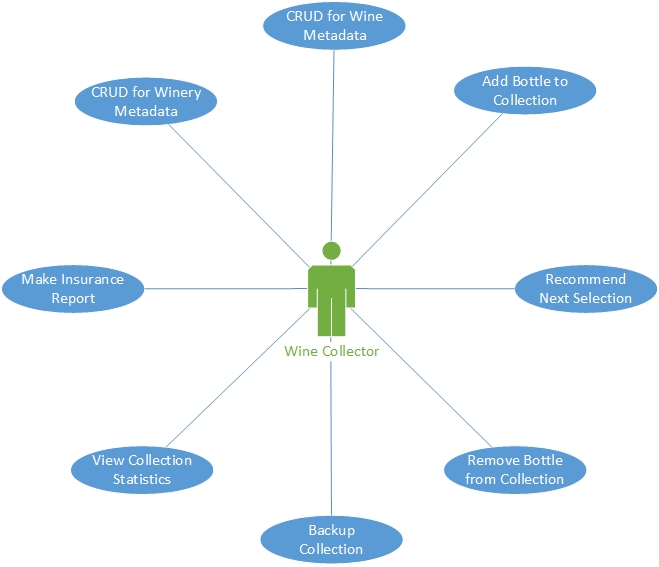
Isn’t that what its all about? I don’t care if your the CEO or the Janitor. Every role in a company has a customer. And it is important the Application Developer knows the customer of the application. To often in Corporate America the Developers only have a Project Manager/Product Owner to glean this information from. Rarely do they get to talk to the eventual users of the application/service they are about to build and as we will see in future blogs the implications of these Activities are far larger than the 4 to 6 words identifying them. But, I digress, starting off any Application Development Project the “customer” (or the closest thing the team sees) waves their hands in the air while describing their “vision” and lots of “domain specific language” is used (DSL) and most times it feels like you are listening to Charlie Brown’s teacher. Since it is usually rude to interrupt the “customer” the team should take copious notes and identify terms that need clarification. The team should ask as many questions as time allows in the first meeting with a goal to get a clear understanding of the domain specific language the customer uses. It really helps if a simple drawing could be made to capture the “big idea’s”. For me, this is a Use Case diagram. In the future this diagram will be supported with other diagrams but in the earliest stages It is best to stick to the “KISS principle” so the following is the Use Case diagram for what I propose to build.
Use Cases in English
For the uneducated the “Wine Collector” is referred to as the “actor” and the “blue ellipses” are things the actor wants to do. It should be noted that the activities are not ordered in this diagram. Each of the Activities “should” have a paragraph or two (if it is more than two you have over thunk it). Most young developers don’t find this diagram very valuable but, over the years I have come to appreciate it. It brings you back to the customer perspective. Somewhere in that hundred thousandth line of code a programmer can lose sight of their customer and get “geeked” out with the code. And while it may be “elegant” it often diverges from the customer’s expectations. Sometimes the customer only wants a bare bones solution and the “elegant” code’s “bells and whistles” will never be appreciated by that customer. The customer appreciates “early and under budget” and that wins more brownie points than the elegant code.
Sorry for the rabbit trail. Here are my Use Case Statements:
CRUD for Winery Metadata
Basic functionality to Create, Read, Update, and Delete (CRUD) for the data that will describe a Winery. Care should be given towards the Delete method and it should be denied with an error message if there are bottles in the cellar from this winery. And a warning should be given that all wine data associated with the Winery will also be deleted
CRUD for Wine Metadata
Basic functionality to Create, Read, Update, and Delete (CRUD) for the data that will describe a Wine. Care should be given towards the Delete method and it should be denied with an error message if there are bottles in the cellar of this wine type.
Add Bottle to Collection
When the Wine Collector wants to add a bottle or bottles they search for a winery or add the winery to their database. When a winery exists the Wine Collector is presented with existing wines the application is aware of. If the wine is a new vintage of the wine a link will be provided to add a new vintage to the wine list. If the wine exists the Wine Collector can add more bottles for it. The wine collector is then presented with the option to associate bar codes to the bottle/bottles being added. If the wine collector has more than one cellar a cellar must be selected for bottle storage. The app will allow manual input of the bar code or allow the bar code to be scanned for each bottle. When all scanning is complete the database will be backed up to the cloud data store.
Recommend Next Selection
When the Wine Collector selects a type of wine or the wine color. The application will return a list of wines based on age preference and current age of any bottles in the cellar. The result will also show the number of bottles the cellar(s) have for each wine. If the wine collector has multiple cellars there will be a count of the bottles in each cellar for the wine.
Remove Bottle from Collection
When the Wine Collector retrieves a bottle from a cellar. If the Wine Collector is using a bar code then the Wine Collector can scan the bar code and it will be decremented from the bottle inventory. If no bar code is present the Wine Collector will select a bottle from the cellar inventory and remove it. A prompt will ask if another bottle is to be removed and if so the process is repeated. When the Wine Collector has finished removing the bottle(s) from the cellar, a background task will attempt to back up the updated database to the Wine Collector’s cloud or schedule the backup for when the cloud data store becomes available. The menu on each page of the app will indicate if the backup is up to date or not or in progress, or unknown in the case of the cloud data store is unavailable.
Backup Collection
When a collection is created the application will ask for a cloud location to store the backup. At various times when the local collection changes a backup will be scheduled. If the cloud data store is available it will happen immediately otherwise the menu bar will indicate the backup is not in progress and after a period of time the application will check for the availability of the cloud data store and if available a backup will begin. When complete the menu bar will be updated to indicate the back up is “up to date”.
View Collection Status
The Main Page of the application should provide a dashboard about the Collection. The following information should be presented:
- Total number of Bottles grouped by size
- Total value of the collection
- Percentages of wine color in the collection
- Top Five “Drink Now Recommendations”
Note: Even as I write this with my “Customer” hat on I am realizing several omissions from the Use Cases that have been written. And even this seasoned developer will fly over the details as I attempt to write these down. However, I will finish this post with the Use Cases I have and we will revisit this in another post.
Make Insurance Report
The Wine Collector will be able to create an Insurance Report of the Collection and be able to save it as a PDF at any time. The report will be a detail report of each bottle with each entry containing the following
- Name
- Wine Type
- Winery
- Price
- Cellar Date
- Cellar Name
The report will be grouped by Cellar Name, Cellar Date, Wine Type. If the Wine Collector has more than one Cellar a sub total of the Cellar value will be presented. And after all bottles are listed a Grand Total of Value will be presented.
Next Steps
Now that we have the Use Cases the Application Architect needs to go to work and Prioritize the delivery of them. Which we will do in my next installment
 My WineDb Journey