
In my last post I decided to take my data to the cloud. This prompted all kinds of requirements that I didn’t have to consider before. All businesses are struggling to figure out if they can put their data in the public cloud and “know” its secure. I am no exception to this and wrestle with that dilemma. I dream that I wake up one morning and find out I have a closet full of Listerine (in my database) because some prankster thought it would be “funny”. So I spent the last week figuring out how I can secure my data in such a way to avoid that situation. Couple that with my guilt about not blogging regularly and I found myself under a little stress. In a nutshell I found a blog that summarizes the process to 8 “simple” steps.
- Create a Key Vault on Azure
- Add a new secret “setting” into our vault
- Get the reference of our secret
- Create a new Azure Function App on Azure
- Create an HTTP Function and deploy to Azure
- Create a system-assigned identity for our Function
- Configure the access policy in our Key Vault for our Function
- Use the Key Vault reference as the source of our Function setting
Nothing to it….Yeah, right… 😦
Sadly, while I give props to Joao Grassi and his blog it was like open mouth, insert firehose, turn on water. And where was I in this process when I read that? On the other side of the preverbal Elephant so to speak. Creating data tables and trying to work from the other direction to access the data in those tables. Microsoft, got to love them (and hate them at the same time), gives you many ways to access your data. Some have real costs and some do not. Table Storage is cheap and using Azure Functions to harvest the data is cheap. Organizing that data with a relational database not cheap. Fortunately, my 1000 bottle wine cellar does not constitute a lot of data and I can shift the smarts of organizing it to Azure Functions.
I’d like to say I will go end to end demonstrating all the steps to make and retrieve data in this blog but, it would be terribly long and I would lose most “normal” folks half way through it. So, I will start where I started. Creating the data tables with a data record for each entity and expose one of the data tables using a web based API (Application Programing Interface). Azure tables use two fields to establish identity (uniqueness of a single record): PartitionKey and RowKey. So I created Data Tables to relationally align as follows.
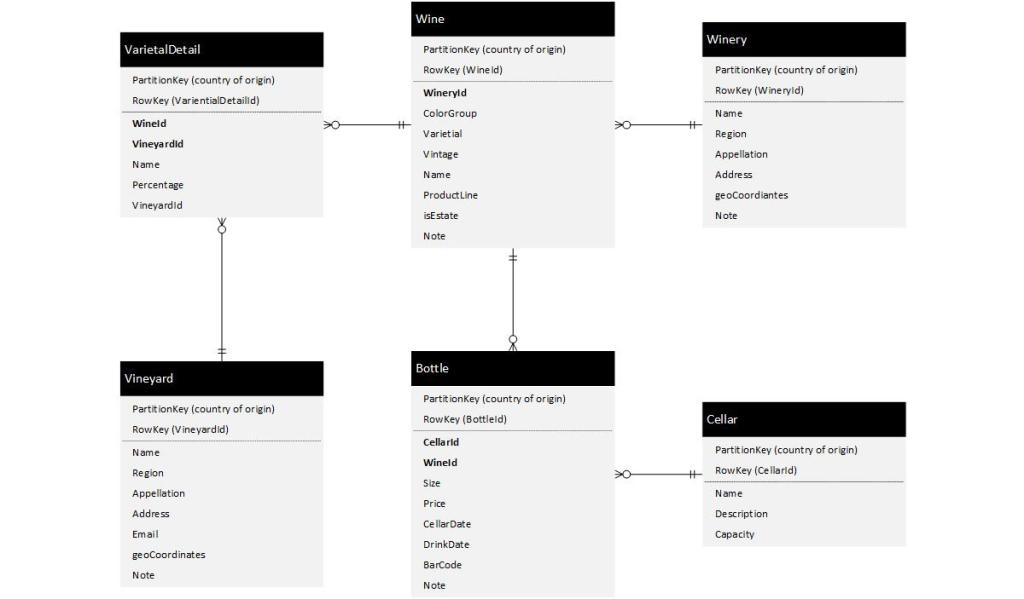
PartitionKey is used to isolate data to a specific cluster. When you get large amounts of data you can move part of it to a different storage account (maybe in a different region) and still treat the data as one large corpus. I chose the Country of Origin and in my one Wine Bottle records the PartitionKey is USA. The RowKey is a string that is a GUID without the dashes. This should be enough for uniqueness in the database but the PartitionKey is just icing on top of the cake. you will see in parentheses what the RowKey is and where there is a relationship the field name is that value. One thing is for certain, I am certain that this representation of the data will change over time and the beauty of Azure Table Storage is it will allow me to do so with little or no pain. However, getting this data into a hierarchy via their “relationship” so that is useful for my application can not be done with a single query to these tables alone as the “relationships” inferred above does not exist in Azure Table Storage. If I want hierarchy (e.g. The bottles of wine in my cellar) I will have to build that programmatically using two distinct queries and some program logic, and that I will leave for future blog posts. However, I can’t leave you without a taste of the fact this is getting real (see: https://mywinedbapi.azurewebsites.net/api/GetCellars).
 My WineDb Journey