
Maybe I am old school and I have lost touch with the younger generation of programmers, but, in my day almost all programmers hated unit testing. I for one was one of them. No longer! When teams are spread across time zones and they contribute to the same project. Nothing will scream “OPPS!” louder then a unit test. It also helps to have code coverage tools like Sonar to keep us honest with tests that touch as close to every line of code as possible. In the era of CI/CD (Continuous Integration / Continuous Deployment) fast unit tests with complete code coverage are essential. I will admit that I got caught in the trap of just coding till I got something going and I am on the road to wellness by getting all my unit tests in order. Well, at least as many as I can write without using an expensive test suite or Visual Studio Enterprise edition. So if I start off by ranting about testing Azure functions, please forgive me, I will try and be brief. Really! Microsoft should be drawn and quartered for not having its fakes and stubs classes in all versions of Visual Studio. At the very least they should make public interfaces for public classes in everything they produce. Sealed Classes should be outlawed.
For context I am speaking of the CloudStorageAccount class in the Microsoft.Azure.CosmosDB namespace. The following is the constructor for my service class which interacts with my Azure Functions.
public DataStore(ILogger log, ExecutionContext context)
{
    var config = new ConfigurationBuilder()
          .SetBasePath(context.FunctionAppDirectory)
          .AddJsonFile("local.settings.json", optional: true,
              reloadOnChange: true)
          .AddEnvironmentVariables()
          .Build();

    log.LogInformation($"Attempting AzureApi Connection");
    var constr = config["DbConnectViaKeyVault"];
    CloudStorageAccount storeAccount = CloudStorageAccount.Parse(constr);
    TableClient = storeAccount.CreateCloudTableClient();
    log.LogInformation($"AzureApi Connection Established");
}
The TableClient class in line 13 is instantiated by the CloudStorageAccount object (storeAccount) created in line 12. TableClient is a public class (with no Interface) and it is where all the action happens with Azure Functions. The storeAccount object is a sealed class, free mocking libraries will not mock it. We would have to fake the storeAccount object and return a mock of the TableClient to test the service class properly. And so, being the poor programmer that I am (financially that is), I am forgoing the tests of the service class. This leaves the three API functions and the “Helper” class that consolidates common code in the API’s. The API’s will emit errors “that we know of” from the service class and we will have to be satisfied with that. The list of tests follows:
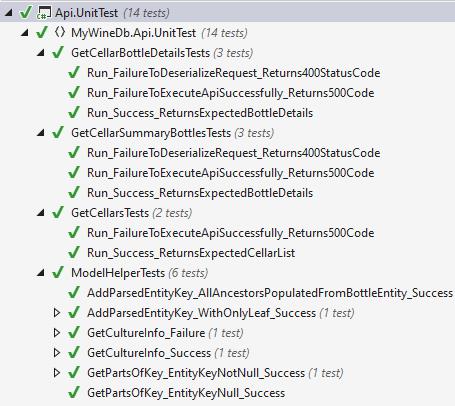
A complete set of unit tests will contain successful as well as unsuccessful (fail cases) tests. And as much as humanly possible, they will touch every line of code in the “method under test”. At first blush the AddParsedEnityKey tests do not have a “Fail” case test. I think it is ok because passing an Entity name that is not in the list does not throw an error and the referenced object that is populated does not change. Or put another way the code in the method will not exit any differently in the fail case than the success case. Purist might argue with me but they aren’t my boss and all the code is covered with the success tests.
Both of the classes GetCellarBottleDetails and GetCellarSummaryBottles follow a similar pattern. The Constructor receives an HTTP Request that contains a body with the required parameter which is serialized into a JSON string. The parameter is deserialized and if that is successful the Service class method is called. If not an HTTP Response message is returned with a “400” Http Status Code. When the Service class responds That key is passed to the service class which executes the Azure Function associated with the API call. The value returned is serialized into a JSON object and if the serialization is successful an OkObjectResult response is returned otherwise the HTTP Response returned has a “500” Http Status Code.
public static class GetCellarSummaryBottles
{
   [FunctionName("GetCellarSummaryBottles")]
   public static async Task<IActionResult> Run(
      [HttpTrigger(AuthorizationLevel.Function, "post",
      Route = null)] HttpRequest req, ILogger log,
      ExecutionContext context, IDataStore dataStore = null)
   {
      log.LogInformation("Processing GetCellarSummaryBottles request");
      var stream = req.Body;
      stream.Seek(0, SeekOrigin.Begin);
      var aztkString = new StreamReader(stream).ReadToEnd();
      var key = JsonConvert.DeserializeObject<AzureTableKey>(aztkString);
      if (key == null)
      {
          log.LogError($"Failed to Retrieve Bottles for Azure Table Key provided: {aztkString}");
          return new StatusCodeResult(400);
      }

      log.LogInformation("GetCellarSummaryBottles Api Request initiated");
         dataStore ??= new DataStore(log, context);
          var result = await dataStore.GetCellarSummaryBottles(key);

      if (result != null && result.GetType() == typeof(List<BottleBriefDataModel>))
         return new OkObjectResult(JsonConvert.SerializeObject(result));
         log.LogError($"Failed to get bottle detail from DataStore.");
         return new StatusCodeResult(500);
      }
   }
}
Looking at the highlighted code above you can observe this method can exit in three places. Each of those cases need a unit test which are shown below
       [Test]
        public async Task Run_FailureToDeserializeRequest_Returns400StatusCode()
        {
            var sut = await GetCellarSummaryBottles.Run(TestHelpers.CreateMockRequest().Object,
                TestHelpers.CreateMockLogger().Object,
                TestHelpers.CreateMockExecutionContext().Object, TestHelpers.CreateMockDataStore().Object);
            Assert.IsInstanceOf(typeof(StatusCodeResult),sut);
            Assert.AreEqual(400, ((StatusCodeResult) sut).StatusCode);
        }

        [Test]
        public async Task Run_FailureToExecuteApiSuccessfully_Returns500Code()
        {
            var ds = TestHelpers.CreateMockDataStore();
            ds.Setup(s => s.GetCellarSummaryBottles(new AzureTableKey(){PartitionKey = "foo",RowKey = "bar"})).Throws<NullReferenceException>();

            var sut = await GetCellarSummaryBottles.Run(TestHelpers.CreateMockRequest(TestParams.TestExpectedAzureTableKeyForBottle).Object,
                TestHelpers.CreateMockLogger().Object,
                TestHelpers.CreateMockExecutionContext().Object, ds.Object);
            Assert.IsInstanceOf(typeof(StatusCodeResult), sut);
            Assert.AreEqual(500, ((StatusCodeResult)sut).StatusCode);
        }

        [Test]
        public async Task Run_Success_ReturnsExpectedBottleDetails()
        {
            var ds = TestHelpers.CreateMockDataStore();
            ds.Setup(s => s.GetCellarSummaryBottles(It.IsAny<AzureTableKey>()))
                .ReturnsAsync(TestParams.TestExpectedBottleSummaryList);

            var sut = await GetCellarSummaryBottles.Run(
                TestHelpers.CreateMockRequest(TestParams.TestExpectedAzureTableKeyForBottle).Object,
                TestHelpers.CreateMockLogger().Object,
                TestHelpers.CreateMockExecutionContext().Object, ds.Object);
            Assert.IsInstanceOf(typeof(OkObjectResult), sut);
            Assert.IsInstanceOf<IList<BottleBriefDataModel>>(JsonConvert.DeserializeObject<IList<BottleBriefDataModel>>((((OkObjectResult)sut).Value).ToString()));
        }
I hope this has been helpful. My next post will talk about unit testing the Mobile Application.
 My WineDb Journey